
Setting Up a Morning Podcast with Codex: From a ChatGPT Briefing to Listening on an iPhone
A daily briefing prepared with ChatGPT brings together the information you want to follow. Finding time to read it is another matter. In my case, I wanted to listen to it on my iPhone while getting ready in the morning.
Do you already use ChatGPT to prepare a briefing and want an audio version? In this article, I will explain the solution set up at home with Codex, an AI agent that can install and configure software using the access I grant it. In this project, ChatGPT writes the briefing, while Codex built the system that turns it into a podcast.
What stood out in this experience was that I did not carry out any of the technical steps myself. I provided the idea, explained the constraints and approved the key decisions. Codex handled the installation, configuration and checks entirely remotely. I did not even have to get up to touch the hardware.
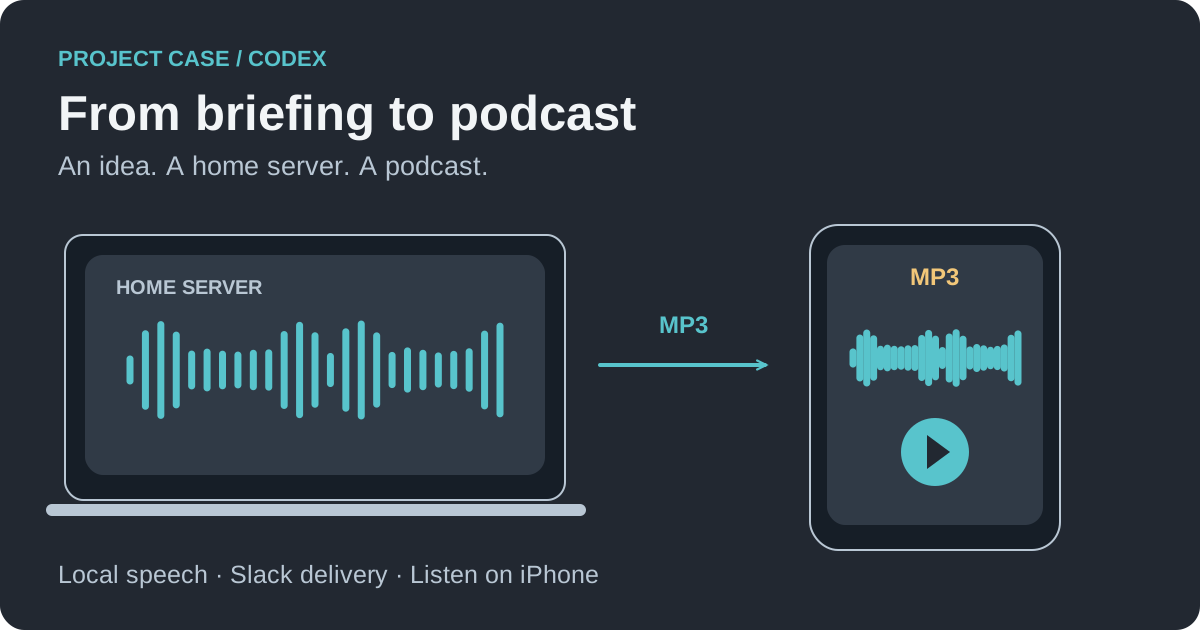
Context and objective
Before starting, I already had a ChatGPT task scheduled to produce a written briefing every morning at 7 a.m. I also had a Lenovo laptop running Home Assistant to manage the connected devices and automations in my home. The laptop stayed on around the clock, serving as my home server.
The table below describes the role of each device:
| Hardware | Purpose |
|---|---|
| Home server: Lenovo ThinkPad T470 laptop, 32 GB of RAM, 1 TB SSD | Host Home Assistant and the services needed to generate the podcast |
| Mac | Talk to Codex and follow the setup process |
| iPhone | Listen to the audio file received in Slack, a messaging application |
| SanDisk Extreme USB drive already connected to the home server | Store the backups needed for the migration |
Here, the podcast is a private episode delivered as an MP3 file in Slack, where I can play it on my iPhone.
The objective was to reuse the existing hardware with three constraints: keep the home automation working, perform the installation remotely and allow the podcast to be produced while the Mac is switched off.
The work was organised into four stages:
- Prepare the infrastructure and safeguard the Home Assistant migration.
- Automate the process from the ChatGPT briefing to the audio file.
- Test the complete process and verify the result.
- Document the configuration to support future changes.
Preparing the infrastructure and migrating Home Assistant
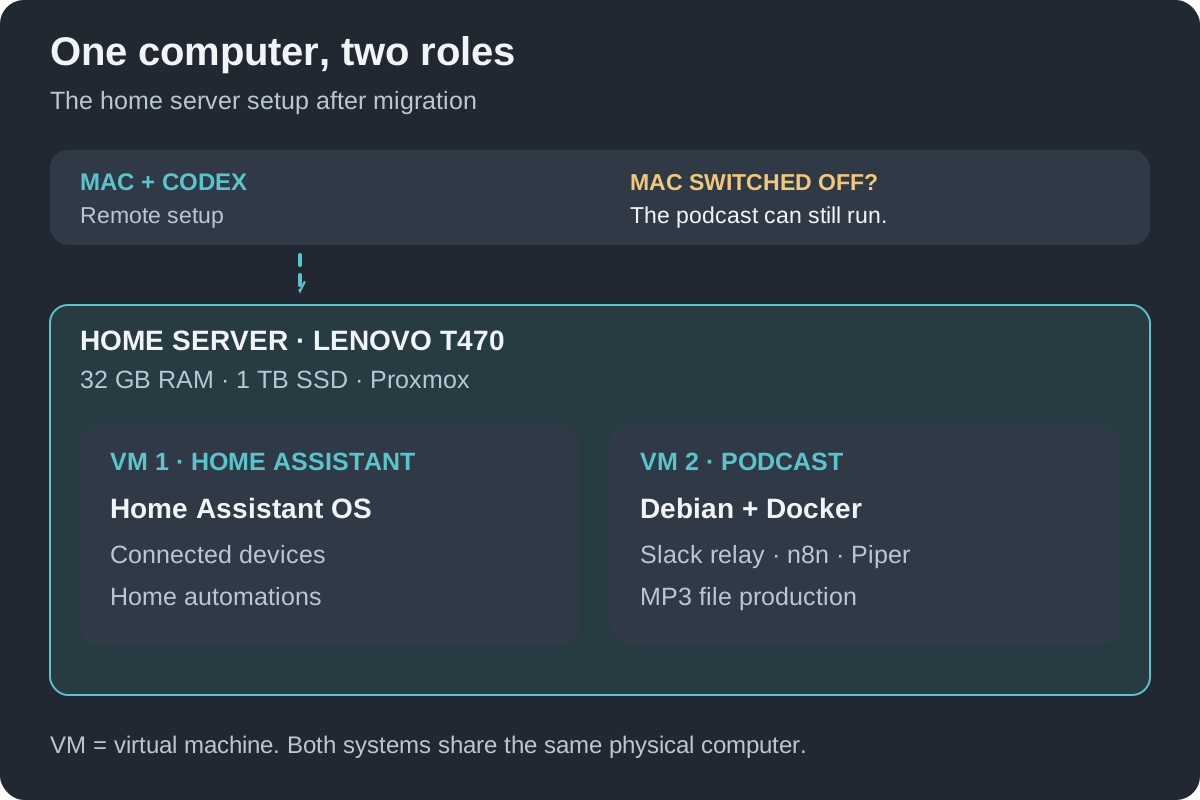
The home server initially ran Home Assistant OS, the operating system dedicated to Home Assistant. To run other services alongside it, Codex suggested installing Proxmox, which allows one physical computer to host multiple virtual machines.
A virtual machine, or VM, works like a separate computer with its own operating system and applications, while using the server’s physical hardware. The setup uses two VMs:
| Virtual machine | Role |
|---|---|
| Home Assistant OS | Keep the home automation and connections to the devices running |
| Debian with Docker | Host n8n, the tool that coordinates automated tasks, along with speech generation and the Slack connection |
Debian is the Linux operating system on this second virtual machine. Docker lets the different services run in separate environments called containers.
This arrangement separates the podcast services from the home automation while sharing the home server’s resources.
The migration required replacing the system on the SSD, the server’s storage drive. Before installation, Codex checked the hardware, remote access options and backups. It prepared a procedure for restoring the previous setup if something went wrong, then asked for my explicit confirmation before erasing the drive.
To perform the installation without preparing a USB stick or working at the computer itself, Codex prepared a temporary system that ran in the computer’s memory (RAM). This allowed it to work on the storage drive while retaining control over the network. An initial boot test confirmed that the connection could be re-established before the migration went ahead.
Once Proxmox was installed, Codex created the virtual machines and restored Home Assistant. It then checked the services and device availability. For example, some kitchen switches had become unavailable after the restore. Refreshing the device information from their gateway, which links them to Home Assistant, made the switches available again without reconnecting them individually.
These checks do not replace a physical test of every automation, but they go beyond simply checking access to the Home Assistant interface.
Automating the briefing-to-podcast process
To retrieve the briefing even when my Mac is switched off, we chose a private Slack channel called brief-du-matin. This conversation space, accessible only to authorised members, connects ChatGPT to the server.
A small program on the server, called the Slack relay, watches for new text in this channel. It then triggers the n8n workflow: the automated sequence of steps needed to produce the audio file.
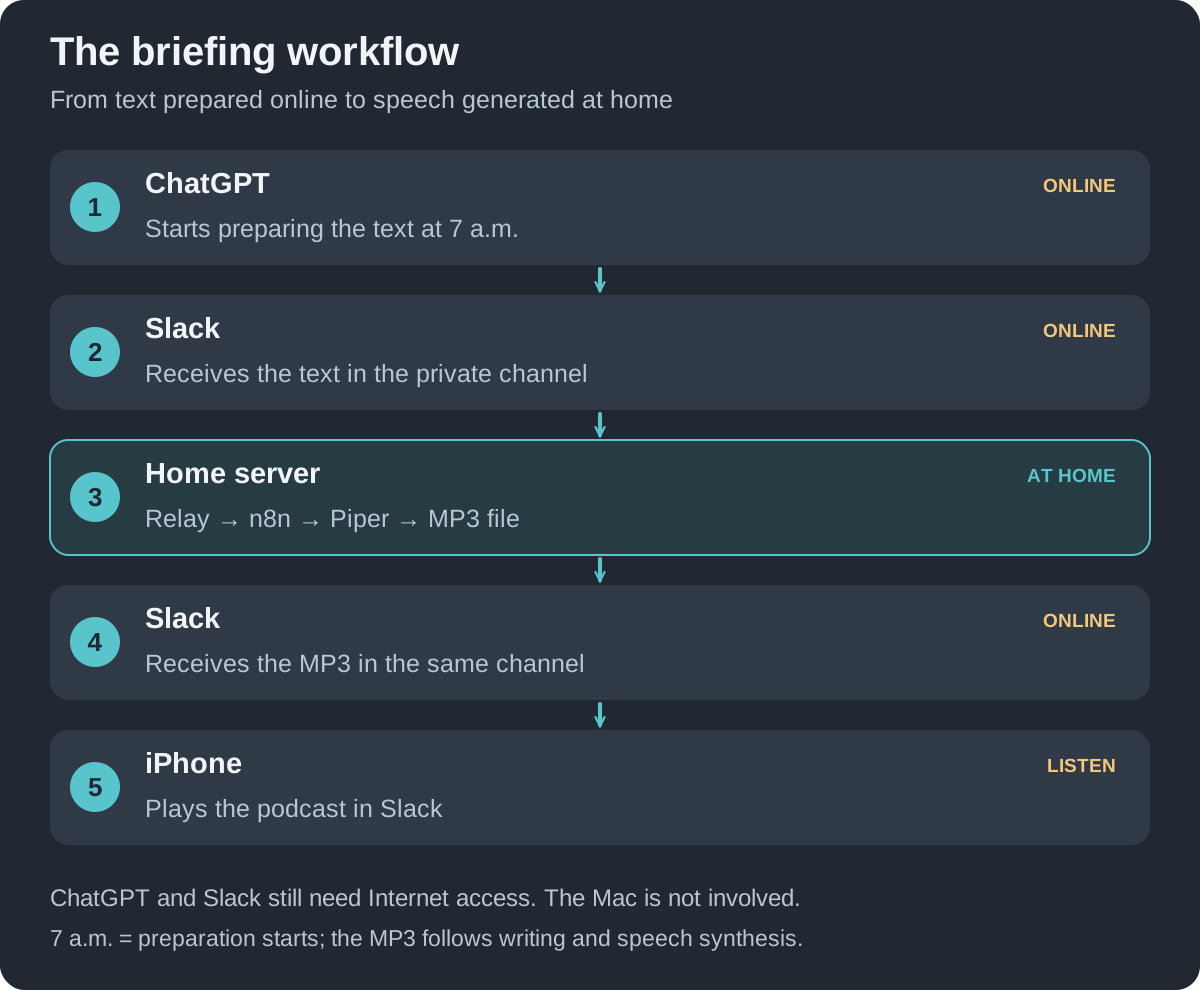
The process works as follows:
- The ChatGPT task starts at 7 a.m., prepares the briefing and posts the text in Slack.
- The Slack relay detects the day’s briefing.
- The n8n workflow starts speech synthesis to turn the text into spoken words, then creates the MP3 audio file.
- The MP3 is uploaded to the same Slack channel for listening on the iPhone.
Choosing text-to-speech: Piper and Kokoro
Piper and Kokoro are two text-to-speech tools: they turn written text into speech using a computer-generated voice. Both can run directly on the server with locally installed voice models. This means I do not need to record myself reading the briefing into a microphone.
Codex installed both tools and prepared a French audio sample with each. Of those samples, I preferred the Piper voice and chose it for the podcast. Codex then configured the workflow to use it and convert the audio to MP3.
Day-to-day operation
The relay keeps track of processed briefings to avoid posting the same episode more than once. It monitors the channel during the morning, without any daily action on my part.
Speech synthesis runs on the home server. ChatGPT and Slack are online services, so an Internet connection is still required. The Mac is used to manage the setup but has no role in producing the daily podcast.
Testing the complete process and validating the result
Once everything was configured, I requested a complete test, from the ChatGPT task through to playback in Slack. Codex triggered the existing task and monitored the process until the MP3 arrived.
The following results were measured during this test:
| Measure | Result |
|---|---|
| Length of the podcast | Approximately 9 minutes and 9 seconds |
| Audio generation time | Approximately 62 seconds |
| Time from text publication to MP3 delivery in Slack | Approximately 97 seconds |
The file was checked and playback was tested in Slack. The Mac was on to trigger the test and observe its progress, but it did not transfer the text, generate the speech or upload the MP3.
This first test confirmed that the complete process worked. At that stage, the scheduled morning run and reliability over several days still needed to be observed. The 7 a.m. start time is when briefing preparation begins; the audio file arrives later, once the writing and speech synthesis are complete.
Documentation and preparation for future changes
A setup of this kind needs to remain understandable and maintainable. I therefore asked Codex to centralise the documentation in a private GitHub repository called home, a place to store files and keep a history of changes.
The documentation covers the home server’s architecture, reference configurations, the podcast workflow, and backup and recovery procedures. Passwords and access keys are stored separately.
The repository can gradually be expanded to cover the other devices in the house and their configurations. It will also help with changes such as choosing a different voice or adding a service, without having to work out how the installation was built.
Responsibilities and lessons from the project
My involvement in this setup focused on decisions and authorisations. Codex handled the technical implementation.
| My involvement | Work carried out by Codex |
|---|---|
| Define the need and constraints | Inspect the hardware and propose the architecture |
| Authorise the migration and SSD erasure | Prepare backups, install Proxmox and restore Home Assistant |
| Sign in to services and approve access | Configure Slack, the relay and the audio workflow |
| Listen to the samples and choose Piper | Install text-to-speech and produce the MP3 |
| Request a complete test and documentation | Carry out the checks and document the solution on GitHub |
Codex also helped resolve problems along the way, including booting remotely and restoring access to devices after the migration.
This autonomy still depends on the tools and access available. Future work on the home server may require someone to be there, particularly if a fault prevents network access.
The same computer now runs both the home automation and the audio generation services. I have received a first podcast in Slack and have a documented setup to build on.
For another practical project carried out with Codex: From StretchTap to an AI Skills Workflow: From Idea to Apple Submission.




Leave a comment